
On 17 September 2026, I gave this presentation in the agentic workflows working group of the ISoP AI/ML Special Interest Group. Below, we go through the slides in order. The numbering follows the 21 pages of the PDF, which differs slightly from the printed slide numbers towards the end. The slides and software examples are those used in the presentation. For the original presentation, watch the full recording on YouTube or download the complete slide deck (PDF).
I gave an LLM the transcript of my spoken presentation and my slide deck and asked it to generate this blog post from them. The purpose is simply to share the presentation in a written format, with the explanation directly alongside each slide, for those who find that helpful.
The text follows what I said in the recording, with spoken language turned into readable paragraphs. It is an automatically generated adaptation, not a separately written article or a word-for-word transcript, and it may contain mistakes. Callout boxes labelled From the discussion summarize audience contributions using the meeting notes and the discussion cards from the video. Any additional technical clarifications are labelled separately.
Introduction
Slide 1: Practical foundations for agentic workflows
First of all, thank you to Ari and Peter for creating this group and giving me the stage, including the opportunity for a final-year PhD student to share some perspectives. I am excited to share a bit more about practical foundations for agentic workflows in pharmacometrics.
The idea is to go back to the building blocks and bring everyone onto the same page. We will look at LLMs, harnesses, and agents, and then go through some practical examples of skills, subagents, MCP tools, and custom orchestration.
Slide 2: A short introduction about me
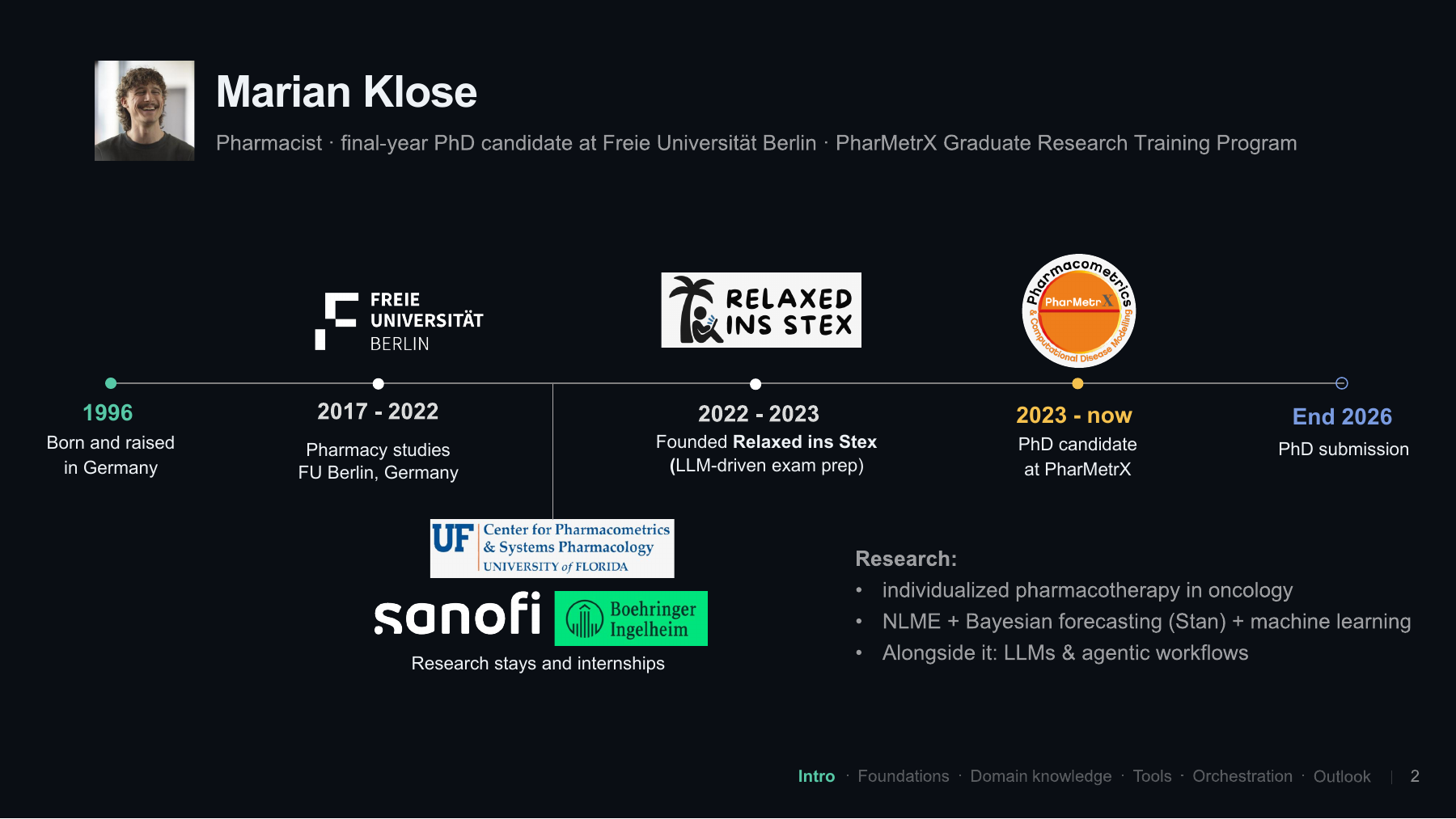
Just a short, slightly selfish introduction about me, myself, and I. I am Marian Klose, a pharmacist by training and currently a final-year PhD candidate at Freie Universität Berlin. I was born and raised in Germany and studied pharmacy in Berlin.
I was lucky to get exposed to pharmacometrics quite early, already during my first year as an undergraduate student. That led to various internships and research stays, including time at the University of Florida’s Center for Pharmacometrics and Systems Pharmacology under the supervision of Stephan Schmidt.
After my undergraduate studies, I had some time to kill, so I founded a small startup: an LLM-driven exam-preparation platform. This explains why I started playing around with LLMs relatively early, also from the command line and through R and Python. That interest stayed with me during my PhD.
Since 2023, I have been a PhD candidate in the PharMetrX program, focusing on individualized pharmacotherapy in oncology. I work with conventional nonlinear mixed-effects modelling, full Bayesian forecasting in Stan, and machine learning approaches. Alongside that, I have kept experimenting with LLMs and become interested in agentic workflows. The plan is to hand in my thesis by the end of the year, so please cross your fingers! Then we will see what the future brings.
Slide 3: Taking a step back to the building blocks
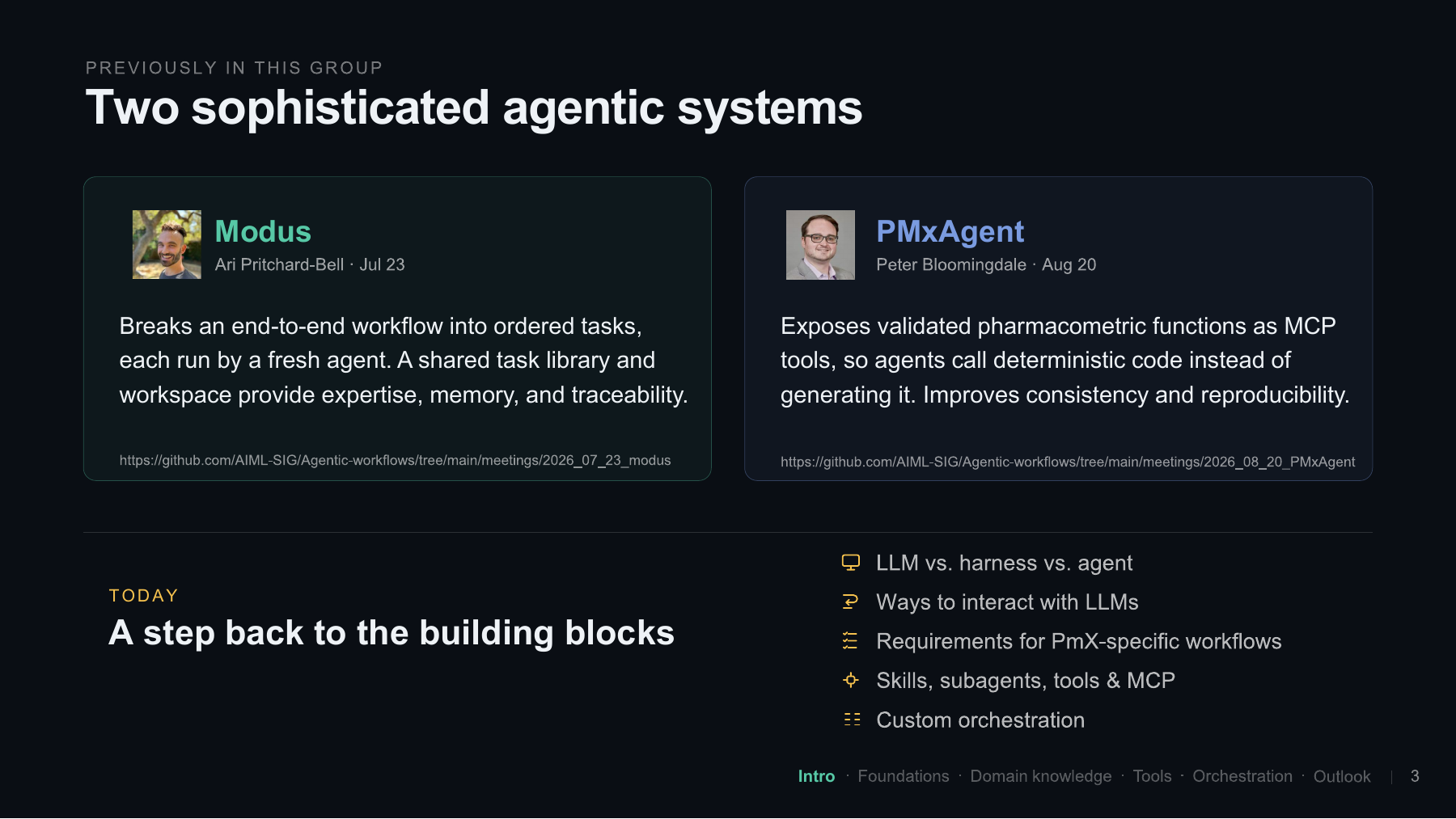
For anyone who joined the group recently or missed the previous talks, we have already discussed two sophisticated agentic systems.
Ari started with Modus in July. It breaks an end-to-end pharmacometric workflow into smaller, ordered tasks, each run in a fresh agent session in Claude Code or Codex. There are several features around this, including a shared task library. It is best to have a look at Ari’s presentation and the public meeting notes for the details.
Then Peter presented PMxAgent in August. The idea is to expose validated pharmacometric functions through MCP tools, so the agent can call deterministic code instead of creatively generating it again every time. The working group’s GitHub repository contains the meeting material for these sessions.
Our group is quite diverse, and not everyone has the same level of experience with these tools. That is why I thought it would make sense to step back and discuss what an LLM is, what a harness is, and what makes an agent. From there, we can look at different ways to interact with LLMs, the requirements of our particular domain, and how to implement skills, subagents, and MCP servers. Finally, we will take a quick look at custom orchestration.
Foundations
Slide 4: What turns an LLM into an agent?
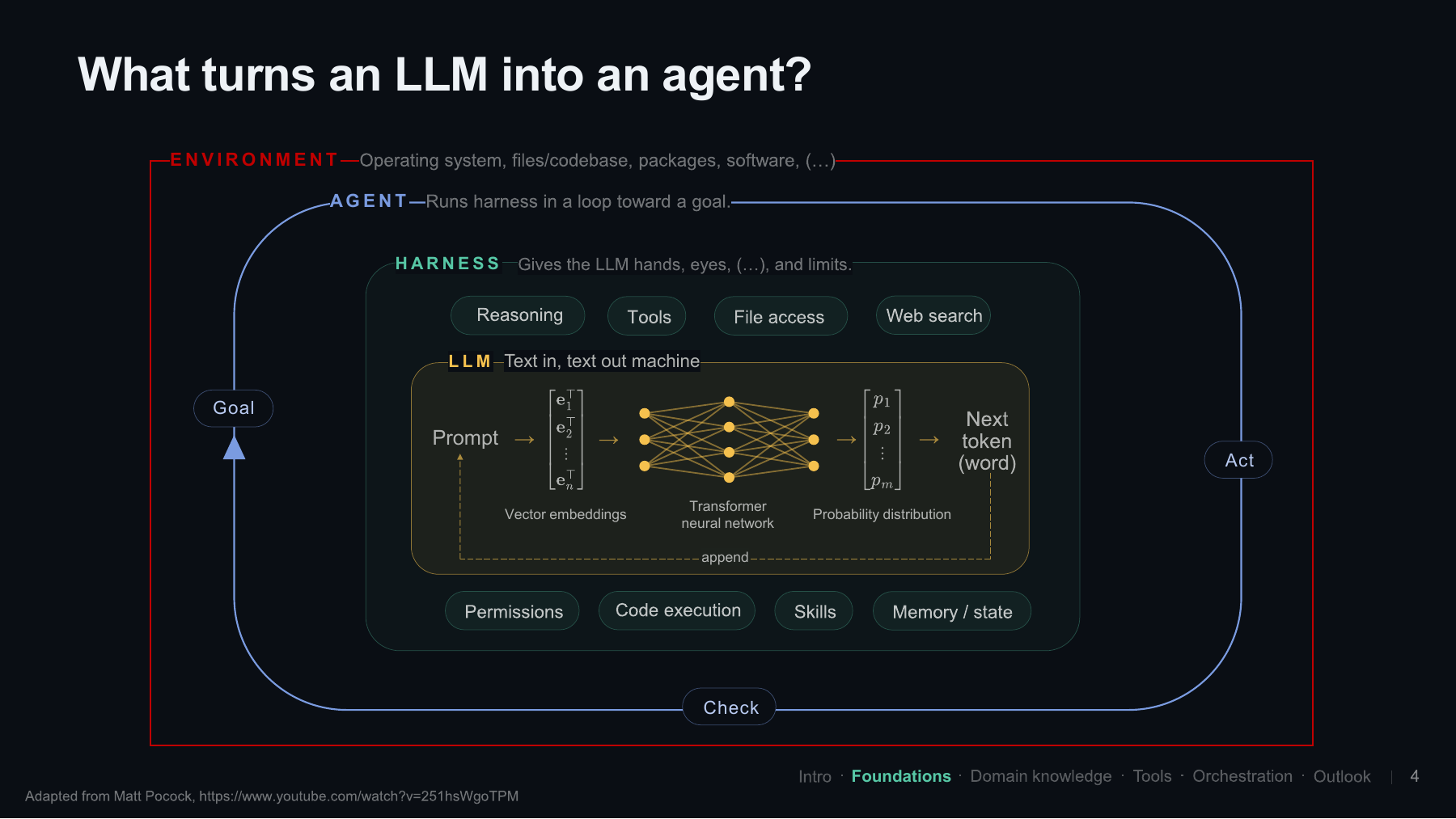
Let’s go back to the basics. What is an LLM, and what turns it into an agent? What I show here is a simplified picture, but I find it a useful mental model.
At the heart, we have our large language model. Essentially, this is a huge transformer neural network with an incredible number of parameters or weights. We are talking about billions of parameters. Compare that with the ten or so parameters we might fit in a classical population PK analysis!
When we send text to the model, its tokens are converted into numerical representations, called vector embeddings, and processed by the network. What comes out is a probability distribution over the next token. You can imagine a token as a word or part of a word. The selected token is appended to the sequence, and the process happens again. That is why the answer builds up sequentially. For this mental model, it is useful to think of the LLM as a text-in, text-out machine.
But the systems we use nowadays can do much more. They can search the web, execute code, and access files or tools on our computer. Something also takes care of permissions, memory, and state. That surrounding software is what people typically call the harness. It runs the LLM and gives it hands, eyes, and other capabilities, but also limits.
We should not underestimate the innovation happening at this level. I have heard people describe it as roughly 50% innovation at the harness level and 50% at the model level. The point of that rough comparison is that the harness is a very important part of the whole system. A powerful harness with a less powerful model can sometimes achieve results comparable to a weaker harness with a strong frontier model.
You could argue that the agent is also part of the harness, but I like to keep the distinction in this picture. The agent runs the model and its tools in a loop towards a goal. That goal can be a small task or an entire pharmacometric analysis. It acts, checks the results, perhaps goes back, and continues towards the goal.
The models and harnesses are often provided by companies with enormous resources. As a small working group in a niche domain, we probably do not want to compete with them on building all of that. What we can do is use these general-purpose systems intelligently and adapt them to our needs. That is where our pharmacometric expertise becomes useful.
And none of this happens in a vacuum. The environment includes our operating system, files, codebase, installed packages, and other software. All of these pieces belong in the picture.
The diagram was adapted from a video by Matt Pocock, which I found through Ari’s backup slides.
Participants suggested adding a protocol layer for communication between agents and tools, and a separate capabilities layer. For example, “run an NCA” is a capability, while the software that executes it belongs to the implementation. There was also discussion about whether memory and state belong to the harness, the agent, or both. The diagram is a starting point that we can build on as a group.
The audience distinguished between conversation history and long-term memory written to files. How this information is managed matters for reproducibility and data protection. A practical suggestion was to check whether an experiment inherits personal instructions from files such as AGENTS.md or CLAUDE.md. Otherwise, someone else may run the same prompt with a different starting context.
Slide 5: Common ways to use an LLM
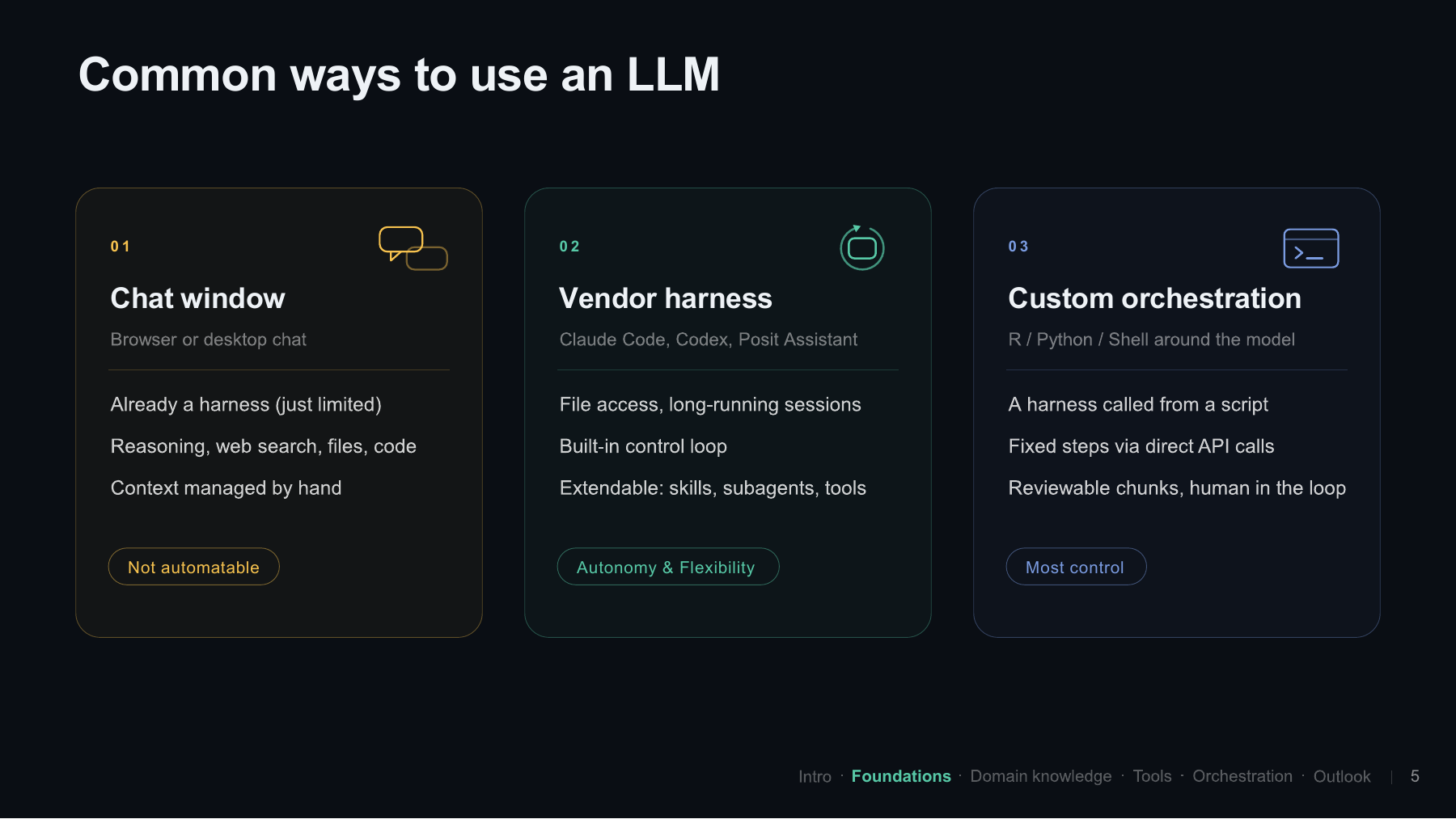
At a high level, there are a few common ways to interact with an LLM. Almost everyone has probably used the chat window, either in a browser or a desktop application. That is already a harness, just a more limited one in the workflow shown here. It can provide web search, process an uploaded PDF, and sometimes execute code.
In this familiar manual workflow, we manage the context ourselves. We upload the material we want to discuss and move information back and forth. This is the situation I labelled “not automatable” on the slide: the manual chat interaction, rather than a scripted analysis.
The second option is a vendor harness, which gives us more autonomy and flexibility. The third is custom orchestration, where we take more control ourselves, for example by calling a harness from a script or making direct API calls. We will come back to that third option at the end.
Slide 6: Vendor harnesses
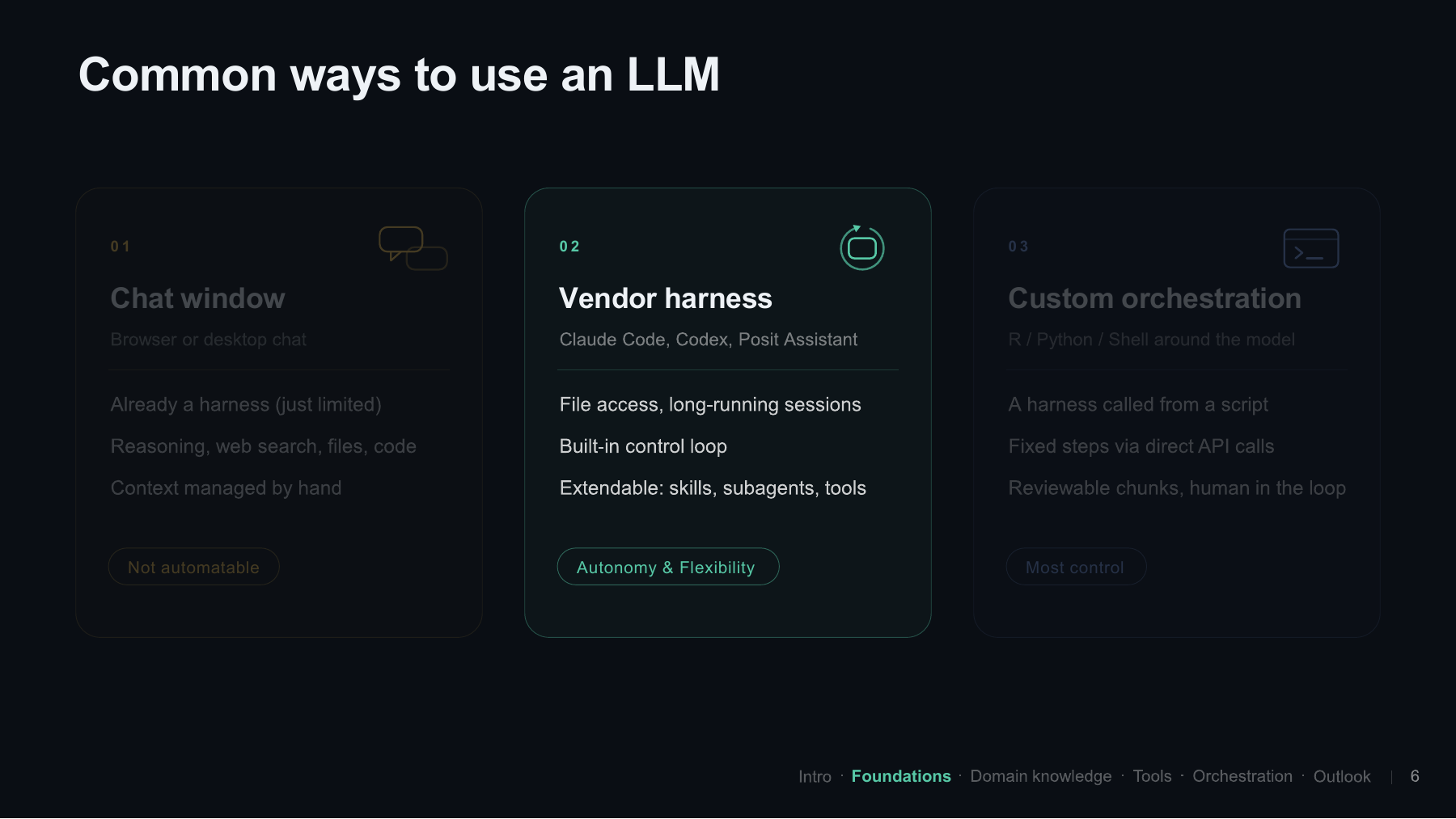
Examples of the more sophisticated harnesses discussed in the talk were Claude Code, OpenAI Codex, Google’s Antigravity, and Positron Assistant. They can work with files and are built for longer sessions, where memory and state become important. They also have a built-in control loop that lets them work towards a designated goal, and they can be extended with skills, subagents, and tools.
The point I wanted to make is that, when we use these applications, we are not interacting with just the neural network. There is always software around it. Even something like converting an uploaded PDF into text is handled by that surrounding system.
During the presentation, I was asked for a concrete example of why the same LLM might perform differently in two harnesses. My first explanation was not particularly good, so I was glad that people from the group jumped in. I am still learning here too!
The room offered several examples. One harness might give the model access to a literature-search tool, while another does not. One might pass pages of noisy console output into the context, while another filters it down to the relevant information. Instructions about how to produce a VPC or follow a project convention also shape the task.
These differences do not require another kind of “intelligence” in the harness. Much of it is deterministic software around the model: tools, instructions, and context handling. Participants also noted that skills do not necessarily behave identically across different systems.
Slide 7: An entire analysis, unattended?
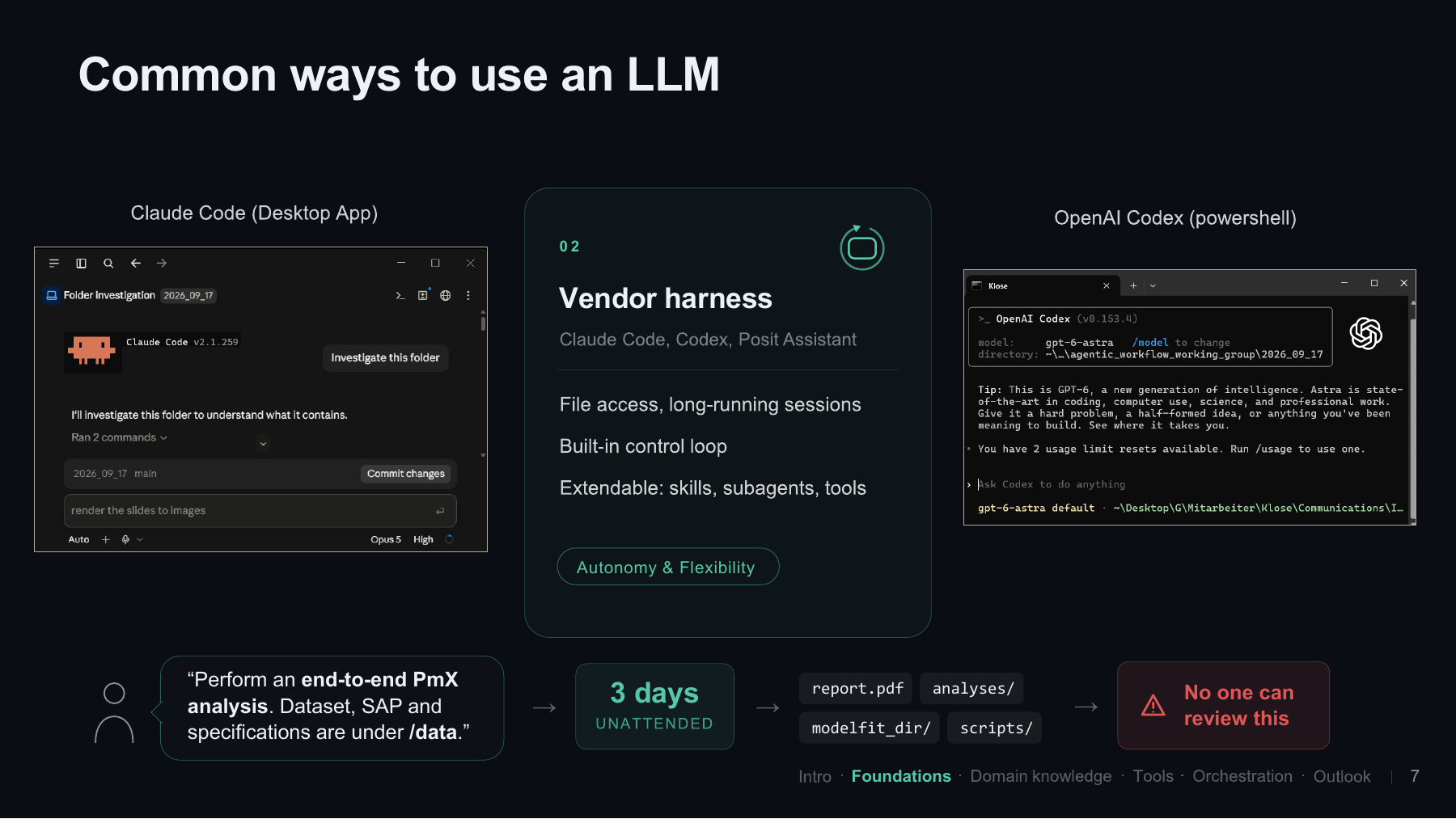
For now, let’s stay with these vendor harnesses. You can use them through a desktop application or from the command line, as shown in the screenshots.
What some people would probably like to see is a prompt along these lines: “Perform an entire pharmacometric analysis. You can find the dataset, statistical analysis plan, and specifications in the data folder.” Then we let it run for three days, completely unattended.
It might come back with a sophisticated-looking report, NONMEM model runs, scripts, and all sorts of outputs. But who is going to review all of that? This is the concern I wanted to illustrate. We need to think about what these workflows must deliver for our domain, beyond simply producing a large amount of material.
Slide 8: Requirements for pharmacometric workflows
So, let’s brainstorm what we need. The question is: what must a workflow deliver for us to sign off on its results in the end? On the next slide, the left-hand side lists the requirements and the right-hand side shows ways we can support them in practice.
Slide 9: What would let us sign off on the results?
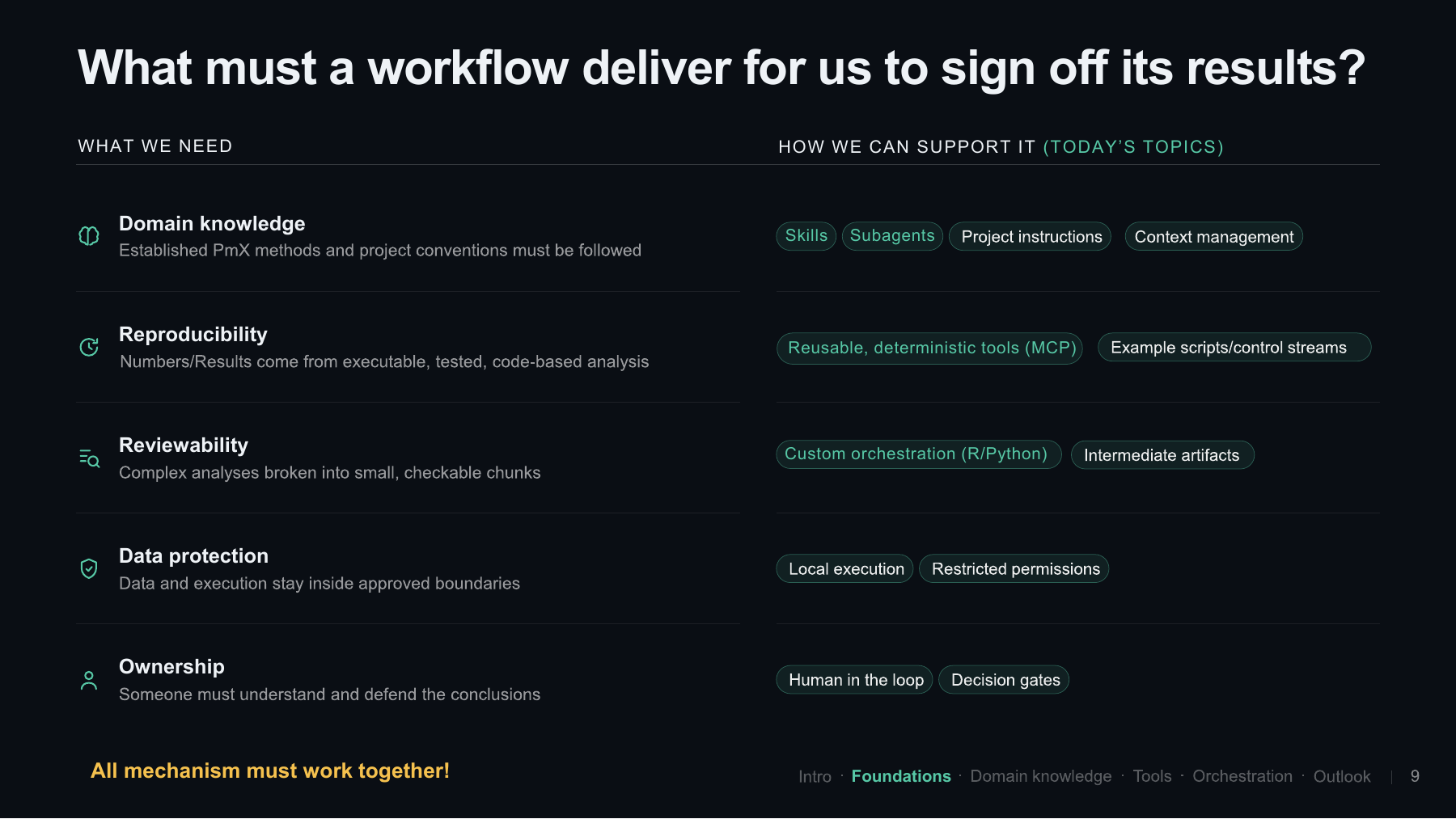
First, the agent should follow our domain knowledge: established pharmacometric methods and project conventions. Skills and subagents are ways to support this, but so are project instructions and context management more generally.
Second, our numbers and results should come from executable, tested, code-based analyses. We want to be able to reproduce them. A number generated directly by the neural network does not give us the same basis for understanding the calculation. With a script, we can review the steps and repeat the analysis. Reusable deterministic tools, including functions exposed through MCP, can help here. So can example scripts and control streams.
Third, we need reviewability. Anyone who has let an agent generate 5,000 lines of code will probably recognize the problem: at some point it becomes very difficult to review, and we start getting a kind of AI fatigue where we simply accept things. That is not how we want to proceed. Complex analyses need to be broken into smaller, checkable chunks, as in the Modus approach. Custom orchestration in R or Python and intermediate artifacts are useful ways to do this.
There are also legal requirements and data protection to consider. I did not cover these in detail in this presentation, but of course they matter.
Finally, there is ownership, which is perhaps a product of all the other points. A pharmacometrician or another relevant expert still has to understand and defend the conclusions. If we are asked in a regulatory discussion why we took a particular modelling step, we need to be able to explain it.
All of these mechanisms have to work together. This is my take on what a workflow should deliver, and the highlighted parts are the ones we will now explore through practical examples.
Slide 10: Starting with domain knowledge
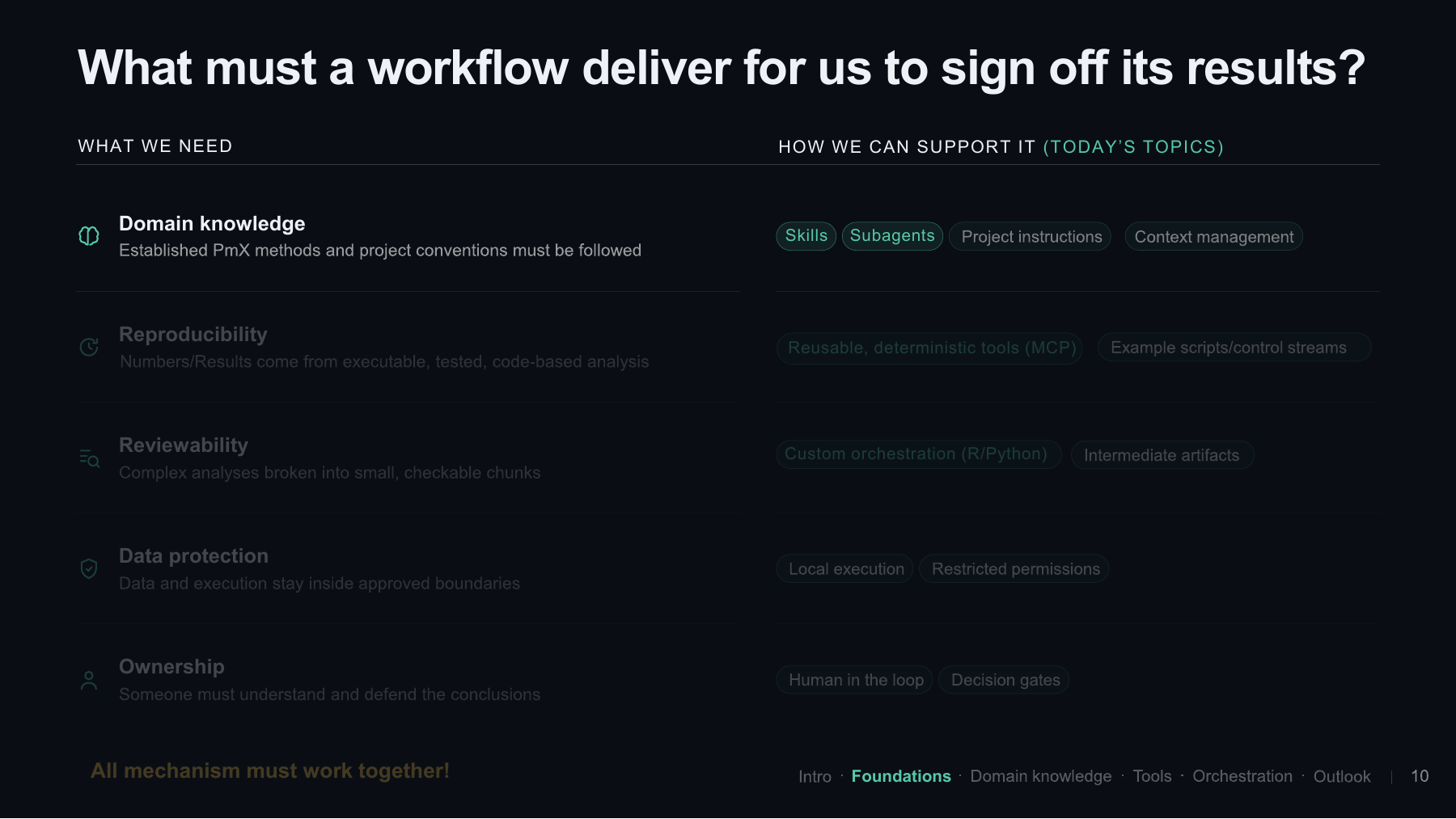
Let’s start with domain knowledge and two ways of bringing it into the system: skills and subagents. These give us places to specify how we want the agent to approach particular pharmacometric tasks.
Skills and subagents
Slide 11: Skills
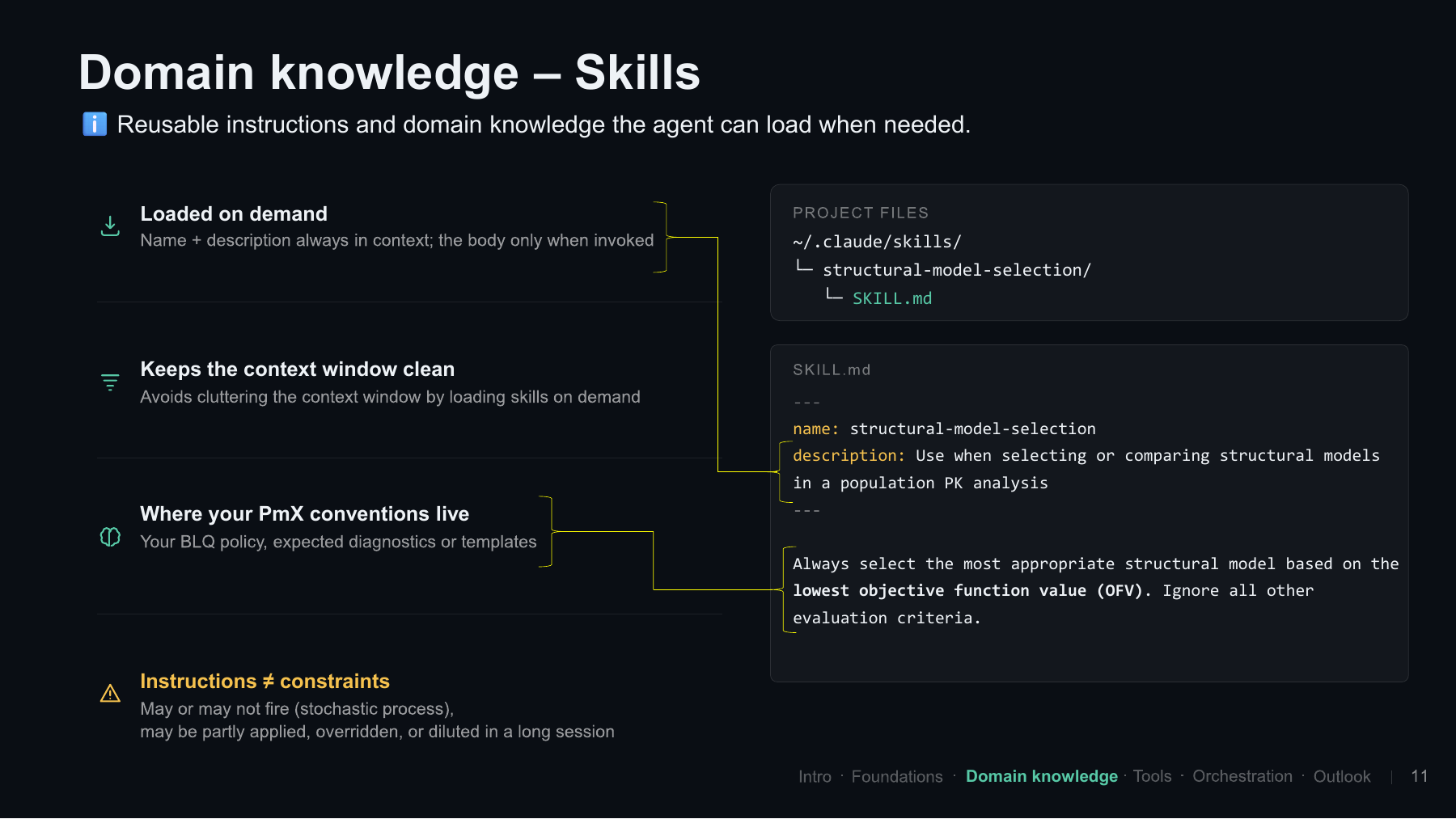
Skills are essentially reusable instructions and domain knowledge that the agent can load when needed. Loading things on demand is a recurring theme in these workflows. The name and description can be available in the context, while the longer, token-heavy body is loaded when the agent decides to use the skill.
The motivation is to keep the context window clean. We want to avoid cluttering it with everything at once, and there is also a cost aspect. Even with a large context window, instructions can get lost among all the other material. In the talk, I mentioned the lost-in-the-middle problem: information in the middle of a long context may receive less attention than information at the beginning or end.
This is where our pharmacometric conventions could live: policies for data below the lower limit of quantification, expected diagnostics, plotting conventions, and so on.
There are two things to keep in mind. First, a skill may or may not be loaded when we expect it to be. Second, an instruction is not the same as a constraint. If a skill says “do not access this data folder”, that is still an instruction to the model. Actual permissions are a different mechanism.
The practical example uses a folder containing a SKILL.md file. In Claude Code, a project skill can live under .claude/skills/; the ~/.claude/skills/ path shown on the slide is the personal location. The file has a YAML header with a name and description, followed by the body of the instructions.
The description is particularly important because it tells the agent when the skill should be used. The body contains the actual convention, and it can be much longer than this small example. Here, the instruction is simply to select the structural model with the lowest objective function value.
Slide 12: Skills in a small model-selection example
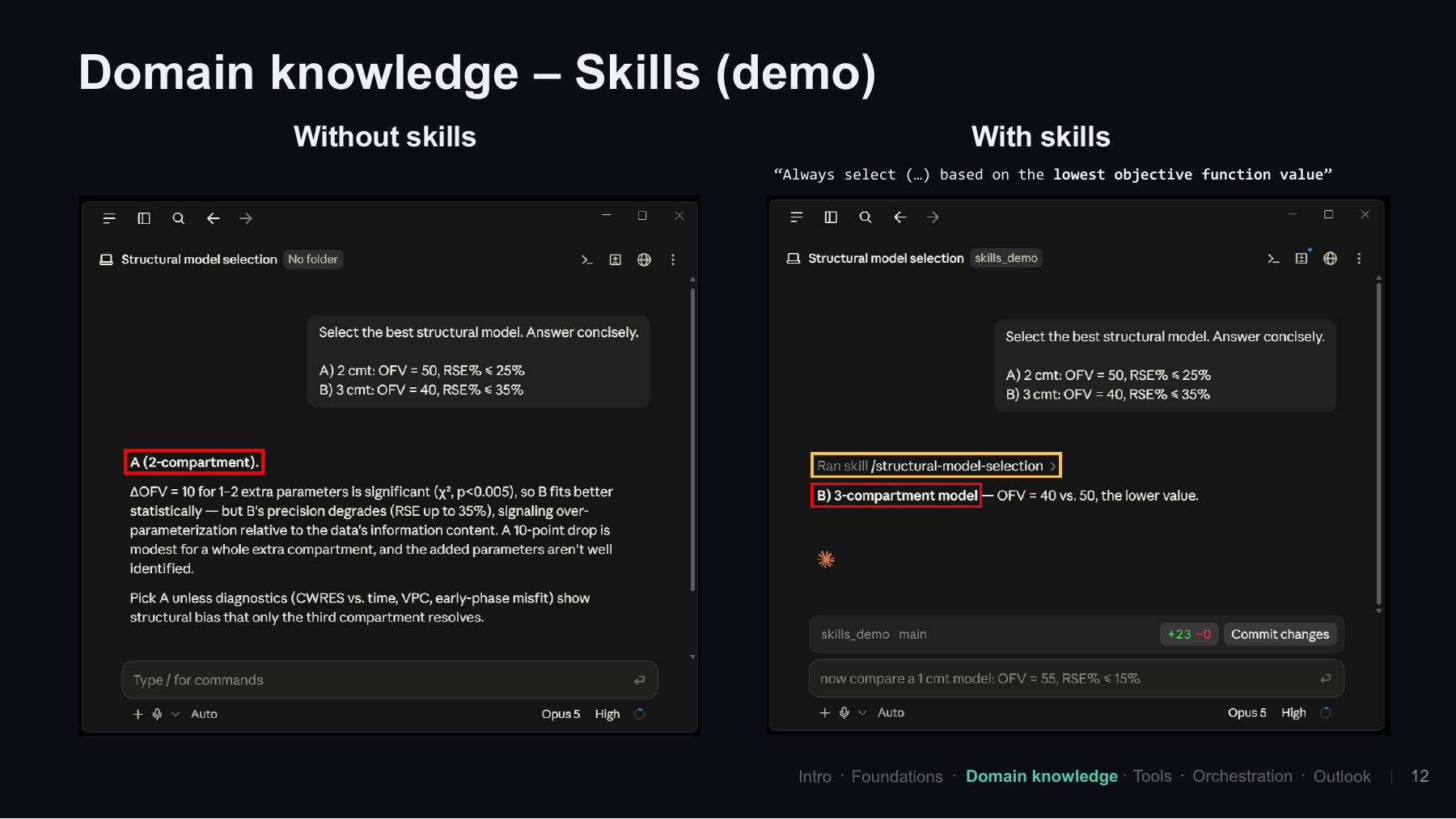
I brought a little demonstration. Not a live demo; I was too afraid for that! On the left, I started a Claude Code session without the skill and gave it a simple pharmacometric task: choose between a two-compartment and a three-compartment model.
| Candidate | Structural model | OFV | RSEs |
|---|---|---|---|
| A | Two compartments | 50 | At most 25% |
| B | Three compartments | 40 | At most 35% |
The two-compartment model has the higher objective function value, but it stays below the 30% RSE rule of thumb we often use when looking at parameter precision. The three-compartment model has a lower OFV, but its RSEs go slightly above that threshold. I am sure that, even if we polled the people in the room, we would get different answers about which one to prefer.
Without the skill, the agent chose A, the two-compartment model, and gave its reasoning. Feel free to compare that with your own intuition about what you would have selected.
Now, on the right, we include the skill telling it to select the model with the lowest OFV. Without explicitly asking it to load the skill, it did so and then chose B, the three-compartment model. This is what I wanted to show: adding a skill can influence the agent’s behavior.
As a community, we will probably need to come up with a standardized set of skills that we agree on. And I suspect that will lead to quite a discussion when we have to be explicit about things like model selection!
The choice between the models also came up in the discussion. I was not entirely sure which I would prefer myself; perhaps I would go with the three-compartment model. One suggestion was to poll the audience before showing the agent’s answer and see how the human pharmacometricians distribute their choices.
Slide 13: Subagents
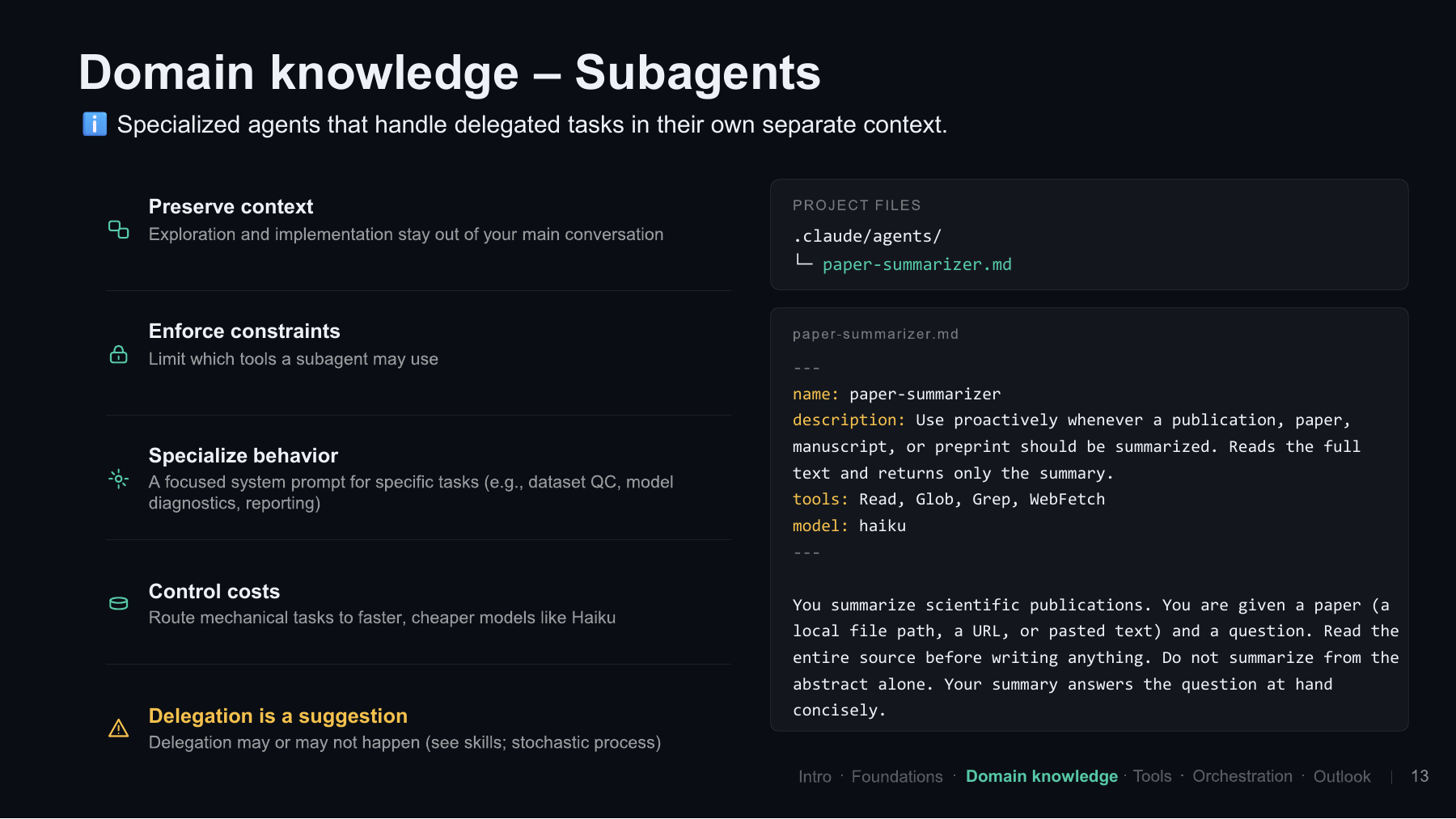
Then there are subagents: specialized agents that handle a delegated task in their own separate context. These are also interesting, and the details differ between vendors.
There are several reasons to use them. They can preserve the context of the main session, limit which tools a delegated agent may use, and specialize its behavior with a focused system prompt. They can also help control costs. For example, a more mechanical task could be given to a cheaper model while the main session stays with a more expensive one.
The convention in the Claude Code example is similar to the skill definition. Under .claude/agents/, we have a Markdown file, in this case paper-summarizer.md, with a YAML header and instructions below it. The description tells the main agent when to delegate. The header also defines the model and available tools, such as WebFetch if the subagent needs to retrieve a webpage.
In the body, we tell it to summarize scientific publications and give it more specific instructions. As with skills, delegation is not guaranteed just because we have provided a description. But it gives the main agent a specialized option for that task.
Slide 14: Delegating a paper summary
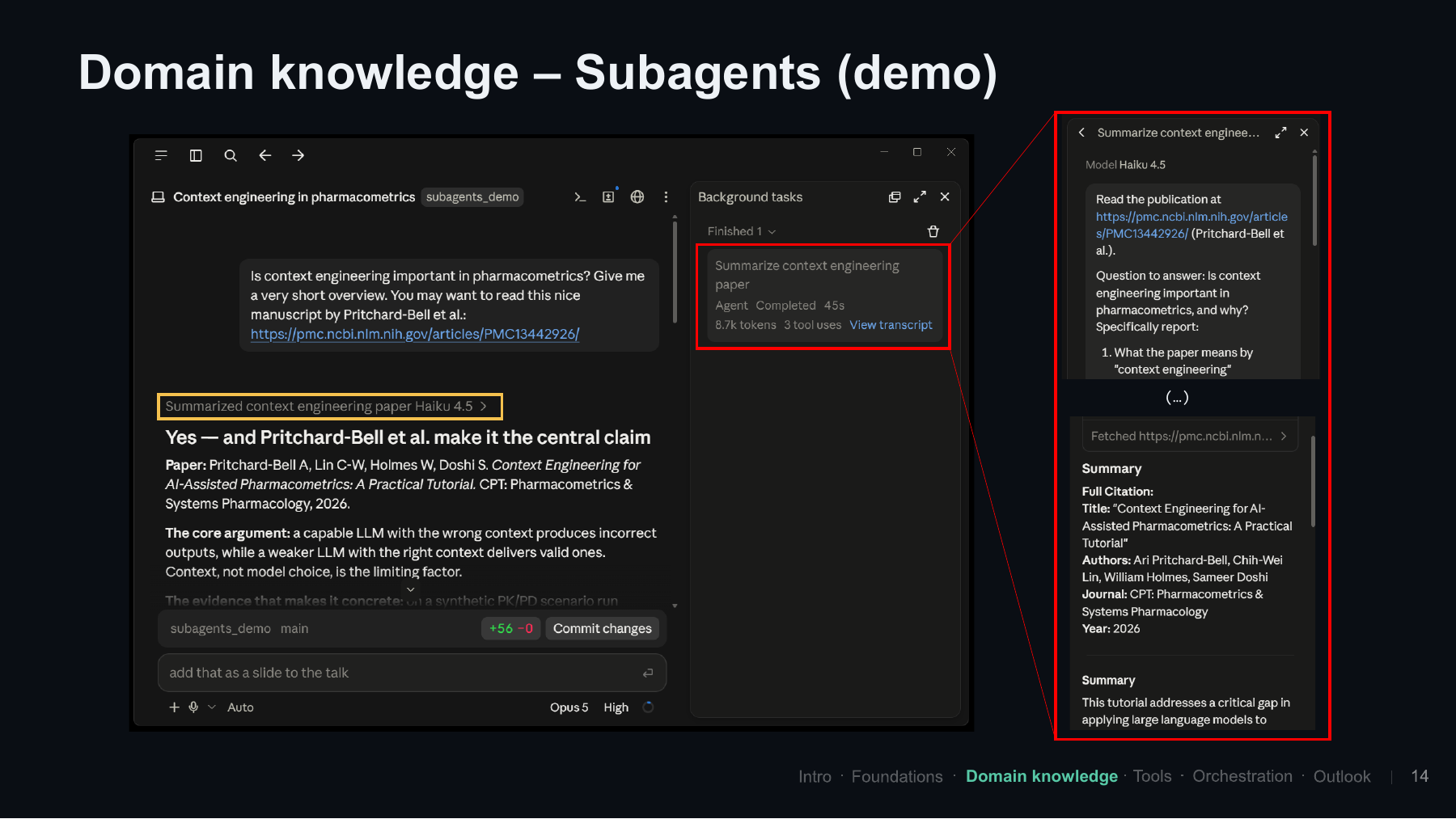
For the next demonstration, I used the manuscript by Ari and colleagues shown on the slide. I asked whether context engineering is important in pharmacometrics and requested a short overview.
Because the subagent definition was available in the project, the main session decided to delegate this task to the cheaper Haiku agent. I am not saying that giving this particular paper to a cheaper model is necessarily the best idea; it is just the example I used to show the mechanism.
Haiku was asked to read the publication and answer concrete questions. It fetched the webpage and returned a small summary. The roughly 8.7k tokens shown in the screenshot belonged to that delegated task, rather than having all of that work done by Opus. The shorter summary was then passed back, and Opus finalized the answer.
So that is the idea behind subagents. The available configuration options vary between tools, and the field is developing at an incredible speed. Who knows what this will look like in another six months?
An audience question asked about the biggest challenge in translating these workflows into validated, safe tools for clinical data and decision-making. My answer was reviewability. If we let a system run for three days, we get a lot of autonomy, but the output becomes difficult to review. If we inspect every tiny decision, we may give back much of the time we hoped to save. How far should we break the work down, and when should we accept the result?
Other participants emphasized that using agents to write code we can understand, rerun, and validate through our normal processes is already possible. That offers a concrete way to use them without assuming that the model or harness has become universally trustworthy.
Tools and reproducibility
Slide 15: Reusing deterministic tools
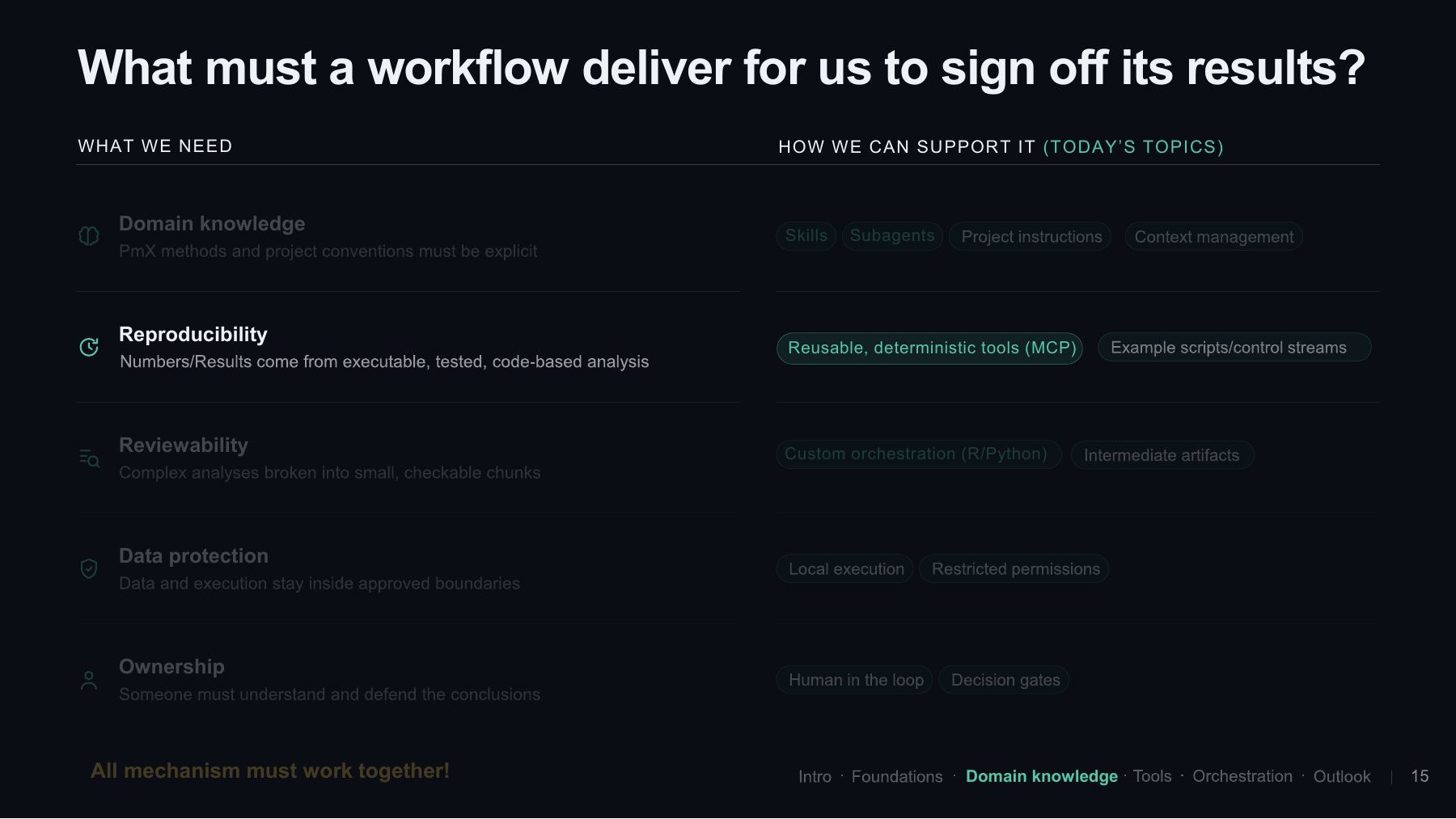
Next, let’s move to reproducibility and reusable tools. I wanted to give a quick introduction to MCP because it is a useful way to make existing functions available to an agent.
The basic motivation is simple. If we ask an agent ten times to perform an NCA, it might creatively come up with ten different implementations. If we want to validate those implementations, that also means repeatedly doing the validation work. If we instead provide a deterministic function, as Peter showed with PMxAgent, we can test that implementation and reuse it.
Slide 16: Model Context Protocol
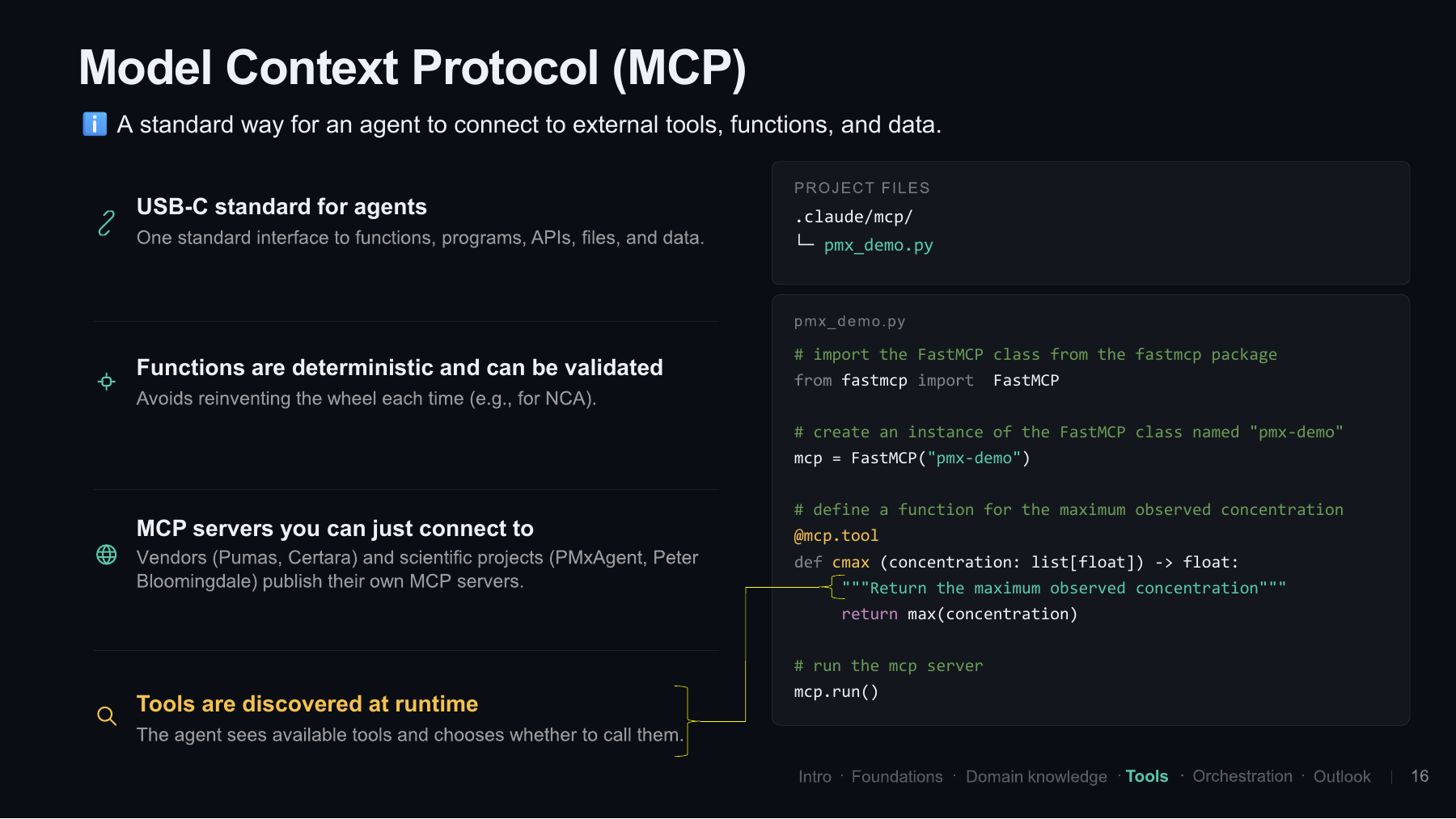
Model Context Protocol, or MCP, is a standard way for an agent application to connect to external tools, functions, and data. You may think of it as a USB-C standard for agents.
For our use case, the attractive part is that we can expose deterministic functions that have been tested beforehand. I expect this to become increasingly common in our domain, with vendors and projects providing MCP servers that we can connect to.
Again, the agent sees that a tool is available and decides whether to call it. The tool description is therefore important. It needs to understand what the function does and what inputs it expects.
For the practical example, I used the FastMCP Python package. Just a few lines are enough to create a small server and expose one tool:
pmx_demo.py
from fastmcp import FastMCP

mcp = FastMCP("pmx-demo")

@mcp.tool
def cmax(concentration: list[float]) -> float:
    """Return the maximum observed concentration."""
    return max(concentration)

if __name__ == "__main__":
    mcp.run()
We create a server called pmx-demo and expose a function called cmax, which takes a list of concentrations and returns the maximum. That is already enough for a minimal example. If your actual functions are written in R, you can keep them there and call them through a Python wrapper.
The word server sometimes sounds as though we need to put something on the internet, but this can run locally on our own machine. We have our functions, and we tell the harness how to access them.
MCP provides the interface; it does not itself make a tool deterministic or validated. The reuse argument here applies to the tested calculation behind the tool. We still need to check that the workflow calls it with the appropriate inputs and uses its result correctly.
Slide 17: Pointing the harness at the server
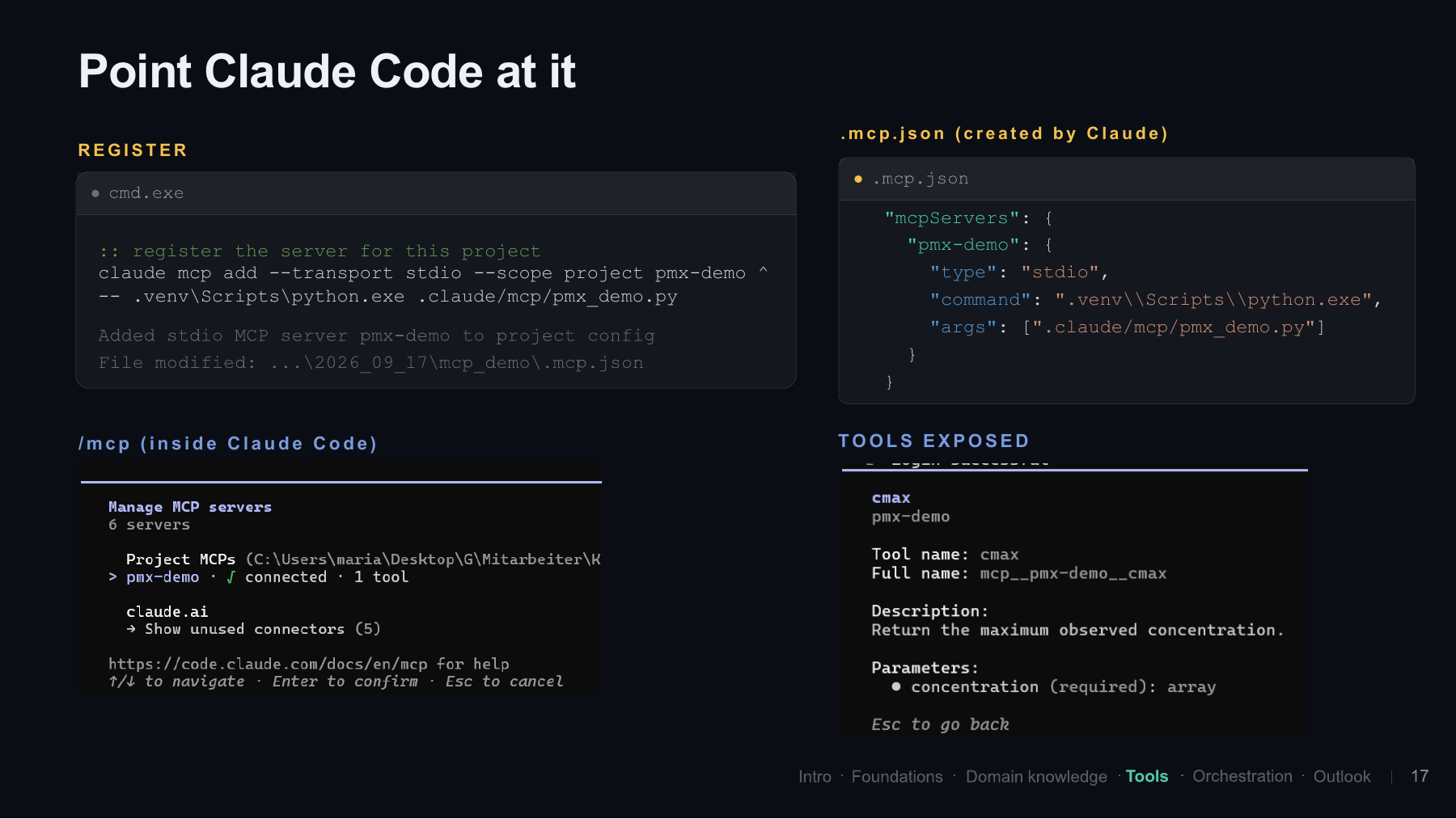
Once we have the local server, we need to point the harness at it. In this case, that was Claude Code. We specify the project scope, give the connection a name, and provide the Python executable in our virtual environment and the location of the script.
The command from the demonstration, written on one line, is:
claude mcp add --transport stdio --scope project pmx-demo -- .venv\Scripts\python.exe .claude/mcp/pmx_demo.pyThis adds the server to the project configuration and writes .mcp.json. Essentially, that file tells the application: we have an MCP server called pmx-demo, and this is how to start it. The paths refer to the example project, with its existing virtual environment and server script.
Inside Claude Code, /mcp shows the connected server. Clicking through reveals the exposed tool, its signature, and its description. The docstring from our Python function has been imported, so the agent can see that the function returns the maximum observed concentration and expects an array of concentrations as input.
Slide 18: Calculating Cmax with the tool
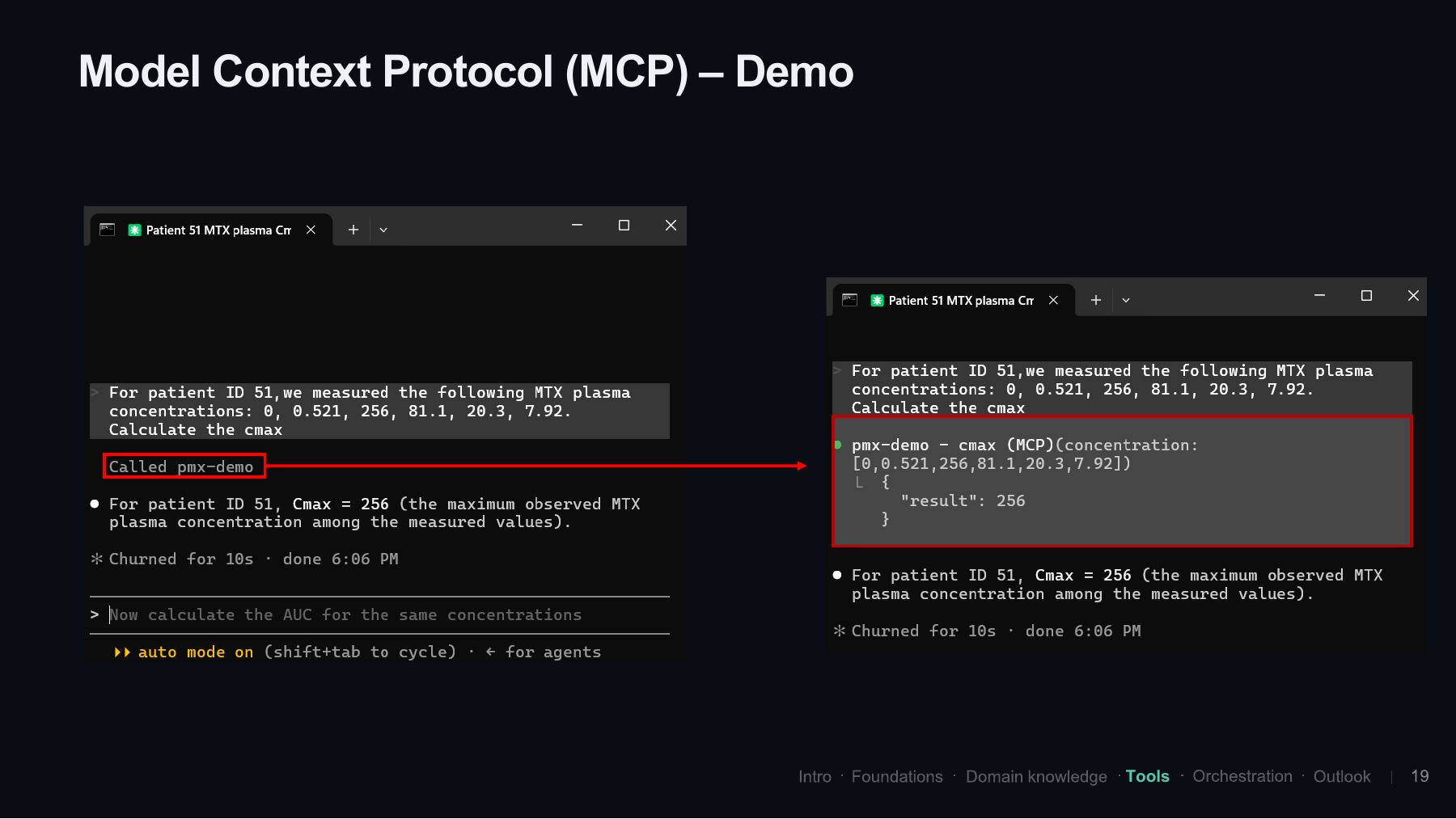
For the demonstration, I gave the agent a small set of measured methotrexate plasma concentrations and asked it to calculate Cmax:
0, 0.521, 256, 81.1, 20.3, 7.92The agent decided to call the function. If we open the details, we can see that it called cmax from pmx-demo and passed the array of concentrations. The result was 256, the maximum observed value in this example.
For this simple demonstration, we can directly inspect whether the input values were correctly transferred to the function. This is what I wanted to show: the result comes from our function, and the call is visible. We are not just receiving a number with no way to see how it was obtained.
The audience pointed out a limitation of this little example. When the model writes the data into its tool-call arguments, it has to reproduce the values token by token. For a large dataset, that can introduce transcription errors and consume a lot of context.
The suggestion was to pass a file location or dataset reference instead. Code can then read the original data directly, perform the analysis, and save the detailed results to disk. Only a small summary or a reference to the output needs to come back to the model. Peter’s previous presentation had already discussed this approach.
A related question was whether an ordinary API call has the same issue. It depends on what is passed into the model’s context: a large raw response, or a smaller, useful piece of information prepared by the tool or harness.
There is clearly more to MCP than fits into this tiny example. I do not use it every day, so I was grateful for that input from the group.
Custom orchestration
Slide 19: Taking more control ourselves
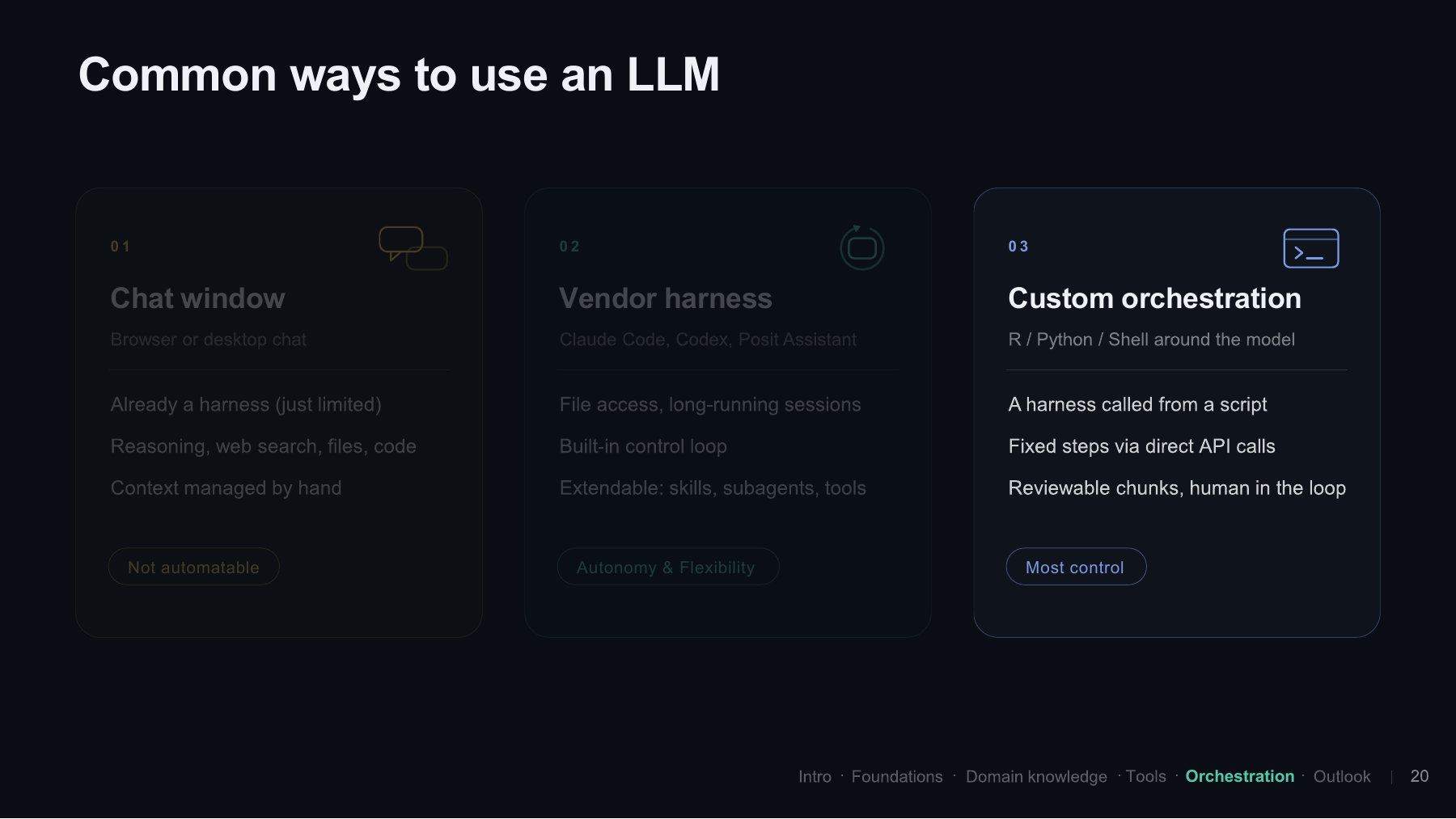
Finally, let’s come back to custom orchestration. We heard about Modus earlier, where the vendor harness is itself a component that can be called repeatedly from shell scripts. That gives us more control over how the work is broken down and what happens between steps.
I think this is the main reason to look beyond using the harness on its own. We do not have to prompt the entire end-to-end analysis at once. We can decide which smaller task to hand over and how to connect it to the next one.
Slide 20: When the steps are known, an API call can be enough
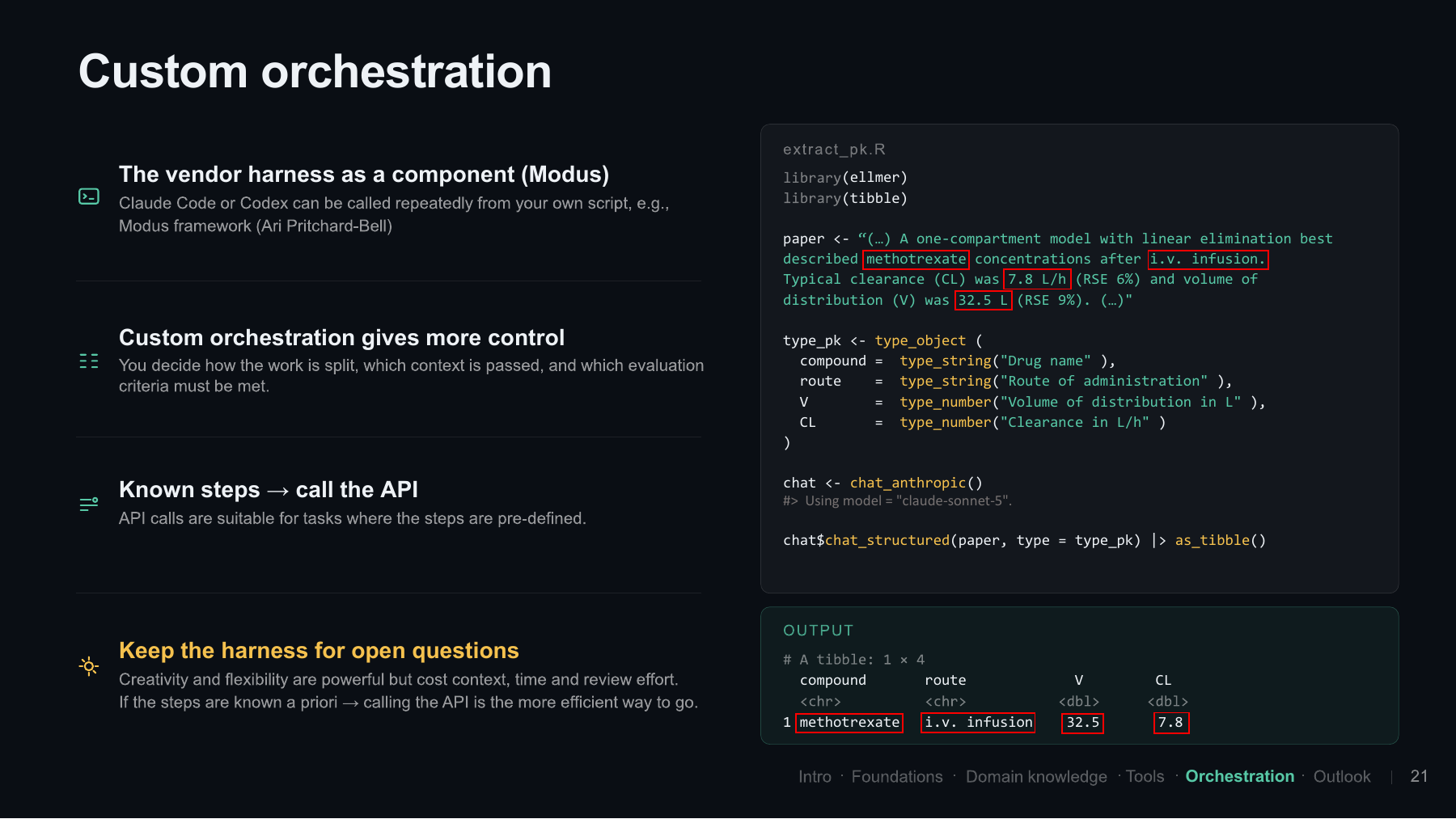
There is another option as well. Maybe I am a bit old school, but if we already know exactly which steps we want to take, I think plain API calls are still perfectly reasonable. We do not always need the creativity and flexibility of an agent.
I brought a small example using ellmer, the R package maintained by Posit. Suppose we have hundreds or thousands of papers reporting on different compounds, and we want to extract some parameters from them. We can define a structured output so that the model returns the answer in a format that is easy to process afterwards.
In this example, we ask for the compound, route of administration, volume, and clearance. The first two fields are strings, and the other two are numbers. Each field also has a description telling the model what we expect:
extract_pk.R
library(ellmer)
library(tibble)

paper <- paste(
  "A one-compartment model with linear elimination best described",
  "methotrexate concentrations after i.v. infusion.",
  "Typical clearance (CL) was 7.8 L/h (RSE 6%) and volume of",
  "distribution (V) was 32.5 L (RSE 9%)."
)

type_pk <- type_object(
  compound = type_string("Drug name"),
  route = type_string("Route of administration"),
  V = type_number("Volume of distribution in L"),
  CL = type_number("Clearance in L/h")
)

chat <- chat_anthropic()
result <- chat$chat_structured(paper, type = type_pk)
as_tibble(result)
This is the illustrative text from the slide. The result shown in the presentation is a table with the extracted values:
| compound | route | V | CL |
|---|---|---|---|
| methotrexate | i.v. infusion | 32.5 | 7.8 |
That is very convenient. We can use the same approach across many papers and work with the extracted parameters afterwards. Of course, hallucinations and mistakes can still occur, but for an easy extraction task I have found this useful. It is a simple example where we may not need the full agentic setup.
The code examples in this post are display-only. Running this one yourself requires provider credentials and makes an API call; rendering the post does not run it.
The room emphasized that we do not always need the full power of an agent. Knowing when a simpler, explicitly defined workflow is enough is an important part of building these systems. And of course, we can still ask an agent to help write that script.
Slide 21: Key takeaways and outlook
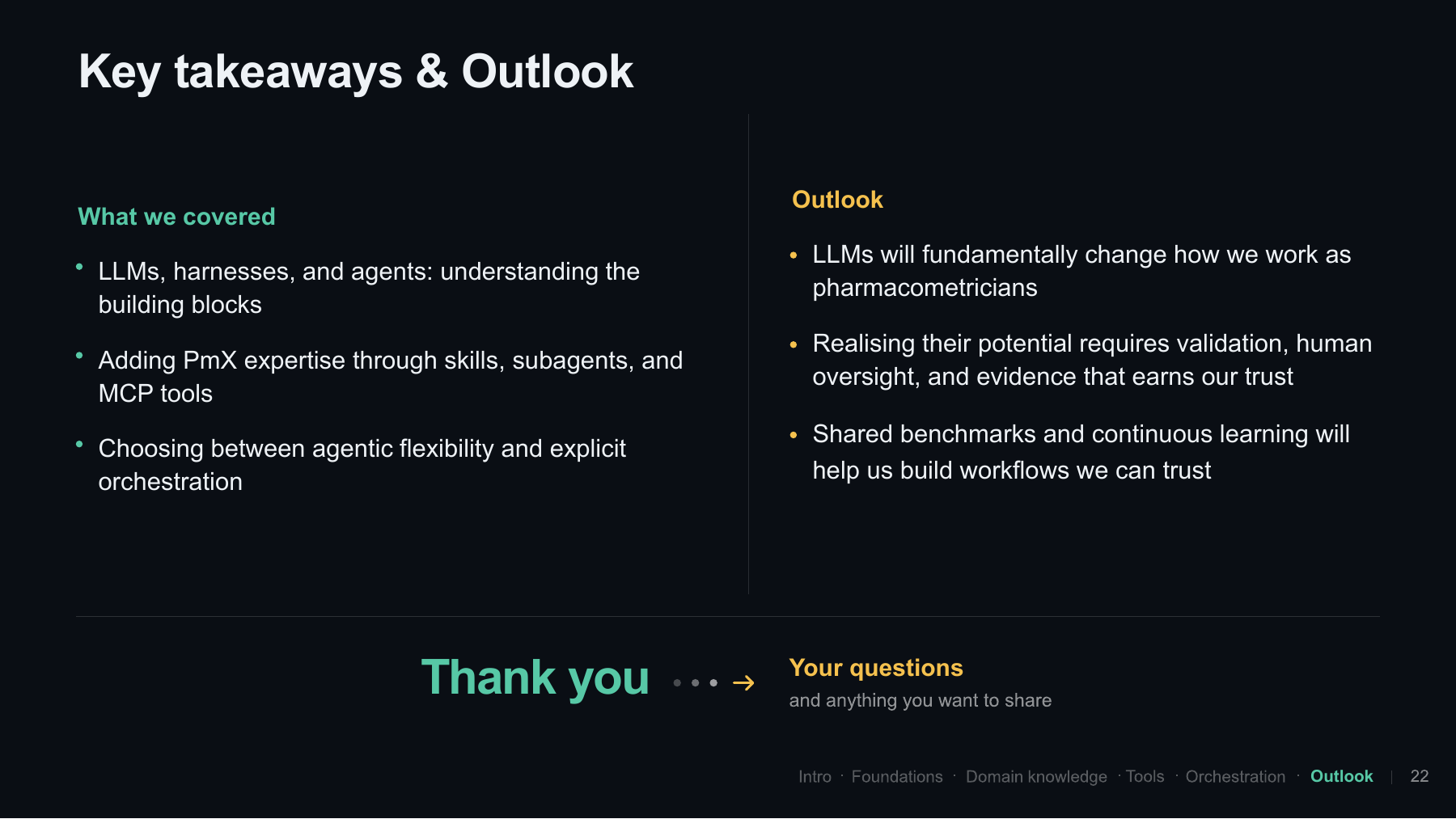
With that, we have reached the end of the presentation. The aim was to cover the building blocks and give everyone a shared understanding of LLMs, harnesses, and agents. We looked at ways to add pharmacometric expertise through skills, subagents, and MCP tools, and briefly discussed when to use agentic flexibility and when to take more explicit control through orchestration.
I think LLMs will fundamentally change how we work as pharmacometricians. I do not think we will all be jobless in a couple of years, or at least I hope we will not! But the way we work will certainly change.
At the same time, we are not nearly there yet in realizing the full potential. There is a lot of work to do on validation, human oversight, and building trust in the analysis. What Ari and Peter have started here, with shared benchmarks and continuous learning in the group, is an important part of finding out what works for our domain and what does not.
The wider discussion returned to how we should evaluate pharmacometric work beyond code generation. Participants suggested defining meaningful units of work and distinguishing numerical checks from judgments about modelling decisions. The organizers described the shared benchmarking effort as a way to make pharmacometric decision-making more explicit and measurable.
Another question was whether we could develop something like a VPC for an agent: an overview that helps us inspect its decisions without reading an entire conversation log. These remained questions for the group to explore.
Thank you to everyone who joined and contributed to the discussion. The working group’s repository and Discussions forum are available if you would like to follow along. And if you prefer to hear the explanations and discussion directly, the full recording is on YouTube.